Docker Service
The Docker Service menu controls the global Docker configuration and runtime behavior.
It allows you to enable or disable the Docker daemon, define storage locations, configure networking, and manage automated update checks.
The Docker Service menu is located under:
Settings → Virtualization → Docker Service
Changes in this section affect all Docker containers running on the system.
Example:
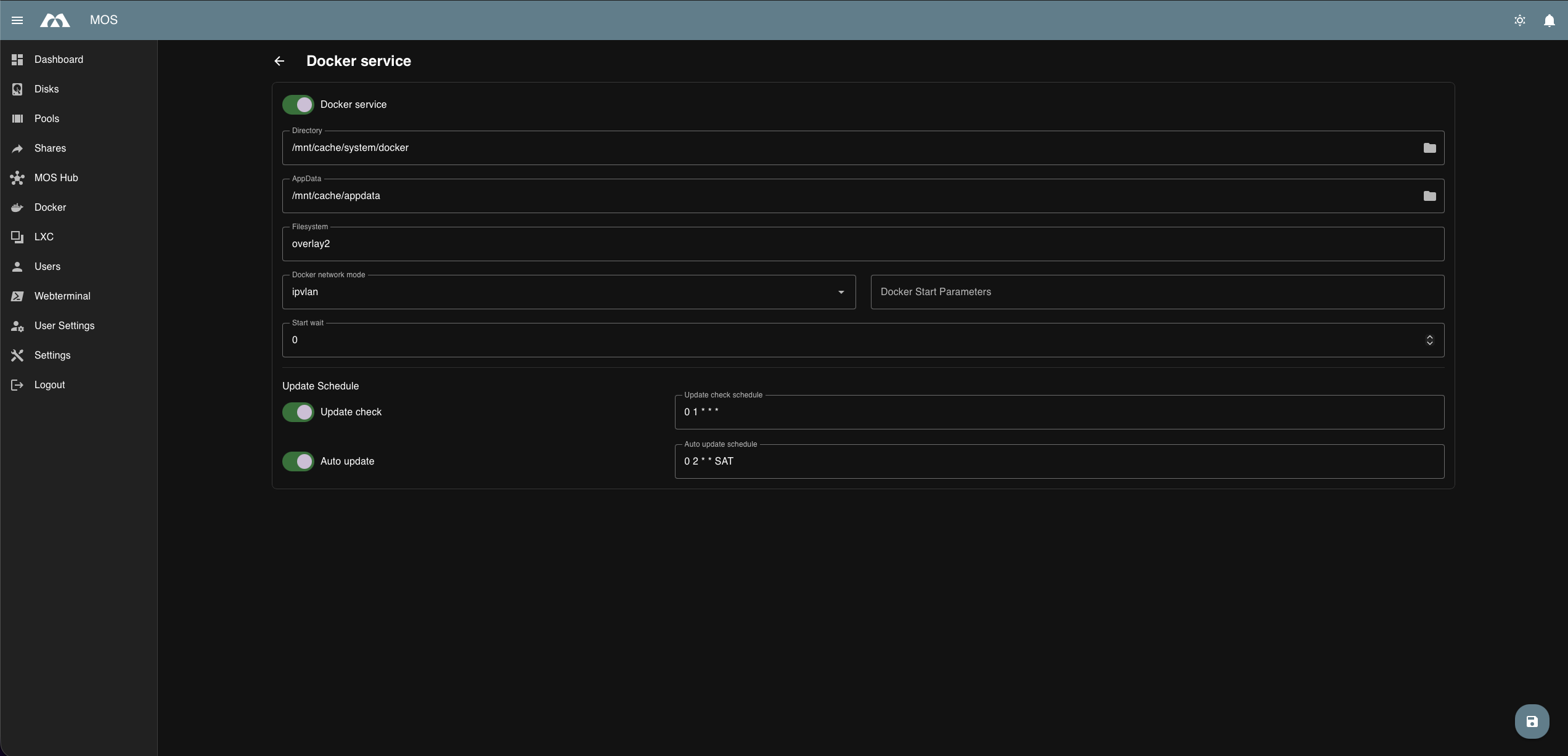
Docker Service Configuration
Enable Docker Service
Enables or disables the Docker daemon.
Enabled:
- Docker containers can be created and started
- Docker templates and the MOS Hub are available
Disabled:
- All Docker containers are stopped
- No container-related services are running
Note:
Disabling the Docker service will stop all running containers.
Docker Directory
Defines the main Docker data directory.
Purpose:
- Stores container layers
- Image data
- Volumes and metadata
Recommendation:
- Place on fast and reliable storage
- Prefer SSD-based pools
Appdata Directory
Defines the directory used for persistent application data.
Purpose:
- Stores container configuration
- Application-specific persistent data
Best practice:
- Place on a persistent storage pool
- Ensure regular backups
Filesystem
Defines the filesystem driver used by Docker.
Default:
overlay2
Notes:
overlay2is recommended for most setups- Requires a compatible underlying filesystem (e.g. xfs with ftype enabled, ext4)
Docker Network Mode
Defines the Docker network driver used for container networking.
Default:
ipvlan
Available options:
ipvlan– Lightweight, high-performance networking with reduced broadcast trafficmacvlan– Assigns unique MAC addresses to containers
Notes:
macvlanmay require additional switch or router configuration- Choose the mode based on your network environment
Docker Start Parameters
Allows defining additional parameters passed to the Docker daemon at startup.
Use cases:
- Custom runtime options
- Advanced tuning
- Debugging
Note:
Only define parameters if you are familiar with Docker daemon options.
Start Wait (seconds)
Defines how long the system waits before starting Docker after boot.
Purpose:
- Ensure network and storage availability
- Avoid race conditions during startup
Optional:
Can be left unset if not required.
Docker Update Schedule
Controls automated Docker update behavior.
Update Check
Enables or disables scheduled update checks for Docker-related components.
Default schedule:
0 1 * * *
Description:
- Performs a daily update check at 01:00
- Does not modify or restart containers
Options:
- Enable
- Disable
Auto Update
Controls automatic updates of Docker components or containers.
Default schedule:
0 2 * * SAT
Description:
- Runs every Saturday at 02:00
- Automatically applies available updates
Options:
- Enable
- Disable
Note:
Automatic updates may restart containers.
Best Practices
- Backup appdata before enabling auto updates
- Schedule updates during low-usage hours
- Use
ipvlanunlessmacvlanis explicitly required - Keep Docker storage on fast disks
Summary
The Docker Service settings define how Docker operates system-wide.
Key points:
- Enable or disable the Docker daemon
- Configure storage and filesystem options
- Select the appropriate network mode
- Define startup behavior and daemon parameters
- Control automated update checks and updates
Proper configuration ensures stable, secure, and efficient container operation.
Parts of this documentation were created with the assistance of AI tools. All AI-generated content has undergone review, but it may still contain inaccuracies, omissions, or outdated information.